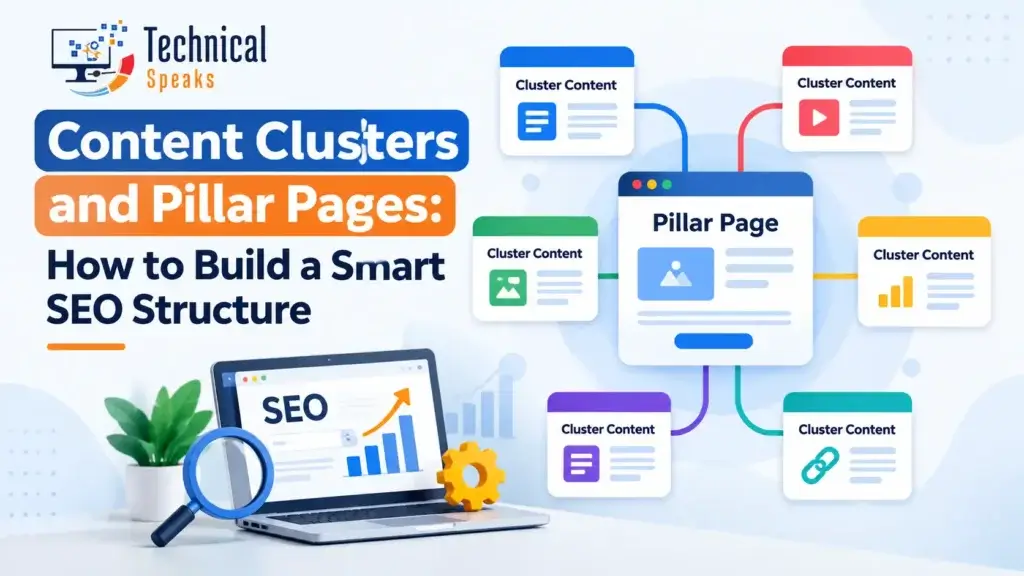
Content clusters are groups of related articles built around one main guide, called a pillar page. The pillar covers a broad topic, the cluster articles go deep on its subtopics, and they all link to each other. This helps search engines and AI tools see that your site covers the topic thoroughly.
Random, one-off blog posts are hard for Google to make sense of. A clear cluster tells it, “this site really knows this subject.” It also makes life easier for readers, who can move naturally from one related question to the next.
This guide explains how clusters work, why they help, and how to build one step by step, including how to turn old posts into clusters.
What are content clusters and pillar pages?
Pillar page
A pillar page is a broad, helpful guide to a main topic. It gives an overview of each subtopic and links to a detailed article on each one.
Example pillar: “SEO for Beginners: The Complete Guide”
Cluster articles
Cluster articles each cover one specific subtopic in depth and link back to the pillar.
Example clusters:
- On-page SEO checklist
- Technical SEO mistakes
- How to build high-quality backlinks
- SEO competitor analysis
How they connect
              Pillar: SEO for Beginners
         /        |          |          \
   On-page    Technical   Backlinks   Competitor
   checklist  mistakes                 analysis
- The pillar links to every cluster article
- Every cluster article links back to the pillar
- Closely related cluster articles link to each other
This network of links helps search engines crawl your content, understand how the pages relate, and pass authority between them.
A real example: the SEO cluster on this site
You’re reading part of one right now. Here’s how our SEO content connects:
Core SEO cluster
- On-page SEO checklist
- Common technical SEO mistakes
- How to create high-quality backlinks
- SEO competitor analysis for beginners
- SEO for a new website
- SEO trends 2026
AI search sub-cluster
Ecommerce cluster
- Pillar: ecommerce SEO guide
- Supporting: off-page SEO for ecommerce, SEO-friendly product titles, image SEO optimization
YouTube cluster
- Pillar: why YouTube SEO matters
- Supporting: how to add keywords to YouTube videos, tips to increase YouTube views
Each article links up to its main guide and across to related posts, so a reader (or a search engine) can follow the whole topic.
Why content clusters help SEO
| Benefit | How it helps |
|---|---|
| Topical depth | Shows search engines you cover a subject thoroughly, not just one keyword |
| Better crawling | Internal links help Google find and understand every page |
| Shared authority | Links earned by one page help related pages through internal links |
| Better user journey | Readers move from one related question to the next |
| Easier planning | You can see gaps and avoid writing two posts on the same thing |
| Fewer cannibalization issues | Each page has a clear, separate job |
Why clusters help with AI search too
AI answer engines like ChatGPT, Perplexity and Google AI Overviews tend to cite sources that answer questions clearly and cover a topic well.
Clusters help because:
- Each article answers one specific question clearly, which is easy for AI to quote
- The pillar ties the topic together, showing depth
- Consistent internal links and terms make it clear what your site is about
Write each cluster article answer-first: give the direct answer in the opening lines, then explain.
How to build content clusters, step by step
Step 1: Pick a pillar topic
A good pillar topic is:
- Broad enough to have several subtopics
- Narrow enough to cover well
- Important to your business
- Something your audience actually searches for
❌ Too broad: “Marketing” ✅ Just right: “Digital marketing for small businesses”
Step 2: Research subtopics and questions
Find what people want to know about the topic.
- Google’s “People also ask” and autocomplete
- Google Search Console queries you already show up for
- Tools like Google Keyword Planner, Ahrefs, Semrush and AnswerThePublic. See our SEO keyword research tools
- Competitor sites that rank well for the topic
Group the ideas by intent: learning, comparing or buying. Look for long-tail keywords and high-traffic, low-competition keywords for your cluster articles.
Example:
- Pillar: Social media marketing
- Clusters: “how to make a content calendar,” “best social media scheduling tools,” “Instagram marketing strategy”
Step 3: Map one keyword to one page
Make a simple spreadsheet:
| Page | Type | Main keyword | Links to |
|---|---|---|---|
| Social media marketing guide | Pillar | social media marketing | All clusters |
| Content calendar guide | Cluster | social media content calendar | Pillar, scheduling tools |
| Scheduling tools | Cluster | social media scheduling tools | Pillar, content calendar |
Give each page one main keyword plus close variations. Here’s how many SEO keywords per page makes sense, and why two pages targeting the same thing cause keyword cannibalization.
Step 4: Build the pillar page
A strong pillar page includes:
- A clear definition or answer at the top
- A short section on each subtopic, linking to its cluster article
- A clickable table of contents
- Diagrams, examples or screenshots
- A FAQ for common questions
Length: as long as it needs to cover the topic well. Pillars are usually longer than cluster articles, but don’t pad them.
Two common pillar styles:
- Guide pillar: a full article that teaches the topic
- Hub pillar: a shorter resource page that introduces and organizes the cluster articles
Step 5: Write the cluster articles
Each cluster article should:
- Target one specific subtopic or question
- Give the direct answer early
- Go into real detail with steps, examples, tools and templates
- Link back to the pillar and to closely related clusters
Use clear HTML headings so both readers and search engines can follow the structure.
Step 6: Link everything together
| From | Link to |
|---|---|
| Pillar page | Every cluster article |
| Cluster article | The pillar, plus 2–4 closely related clusters |
| Other relevant posts | The pillar, using a natural anchor |
Linking tips:
- Use descriptive anchors that match the destination (“on-page SEO checklist,” not “click here”)
- Vary anchors naturally instead of repeating the same exact phrase every time
- Add breadcrumbs to show the hierarchy
- URL folders (like
/seo/on-page/) are optional, since internal links matter more
Run each page through the on-page SEO checklist before publishing.
Step 7: Keep the cluster growing and fresh
- Add new cluster articles as you find new questions
- Update stats, screenshots and examples regularly
- Link every new post into the cluster on publish day
- Reshare pillar content in newsletters and on social media
How to turn old posts into clusters
Most established sites already have content, just not organized. Here’s how to fix that:
- List all your posts (your sitemap or a crawler like Screaming Frog)
- Group them by topic
- Spot overlaps: two or more posts targeting the same keyword
- Decide what to do with each overlap:
- Merge them into one stronger post and 301 redirect the old URL
- Differentiate them so each targets a different intent
- Use a canonical tag if near-duplicates must both stay live
- Choose or create a pillar for each group
- Add the links: pillar to clusters, clusters to pillar, related clusters to each other
- Fix crawl issues along the way. See common technical SEO mistakes
Best practices
- Write for people first. Each page should be genuinely useful on its own
- Show E-E-A-T (Experience, Expertise, Authoritativeness, Trustworthiness) with real examples, original screenshots, clear sources and author bios
- Keep formatting consistent across the cluster so readers know what to expect
- Don’t force links. Link where it helps the reader
Common mistakes
| Mistake | Why it hurts |
|---|---|
| Writing posts with no plan | Leads to overlap and keyword cannibalization |
| Cluster posts that don’t link back to the pillar | Google can’t see the topic hierarchy |
| A thin pillar page | It can’t act as the main guide |
| Ignoring search intent | The page won’t satisfy readers, even if it ranks |
| Same anchor text everywhere | Looks unnatural and adds nothing for readers |
| Never updating the cluster | Content goes stale and loses ground |
How to measure results
Track:
- Organic clicks and impressions for the whole cluster (Google Search Console)
- Rankings for pillar and cluster keywords
- Engagement rate and internal link clicks (Google Analytics 4)
- New backlinks to the pillar
- Whether your pages get cited in AI answers for your topic
Results often show within a few months, depending on competition and how much content you already have. Free options are in our list of free SEO tools.
Frequently asked questions
What are content clusters in SEO?
A group of related articles around one main topic, connected by internal links to a central pillar page.
What is a pillar page?
A broad guide to a main topic that summarizes each subtopic and links to detailed cluster articles.
How many cluster articles do I need?
There’s no fixed number. Many clusters start with 5–10 articles and grow over time as new questions come up.
Do content clusters help with AI search?
Yes. Clear, focused articles that are well connected make it easier for AI tools to understand and cite your content.
Do I need special URL folders for clusters?
No. Internal links and clear topics matter more than URL structure.
What’s the difference between a content cluster and a silo?
They’re similar. Silos traditionally keep links strictly within one section, while clusters also link related topics across sections when it helps readers.
Final thoughts
Content clusters turn a pile of separate blog posts into an organized library. Pick a topic, map one keyword to each page, build a helpful pillar, write focused cluster articles, and link them together naturally.
Start with your strongest topic, organize what you already have, and fill the gaps one article at a time. It’s one of the most reliable ways to build domain authority and topical trust that lasts.
About the author
Saurabh K. has been working in SEO and digital marketing for 10+ years, helping businesses grow their search traffic.