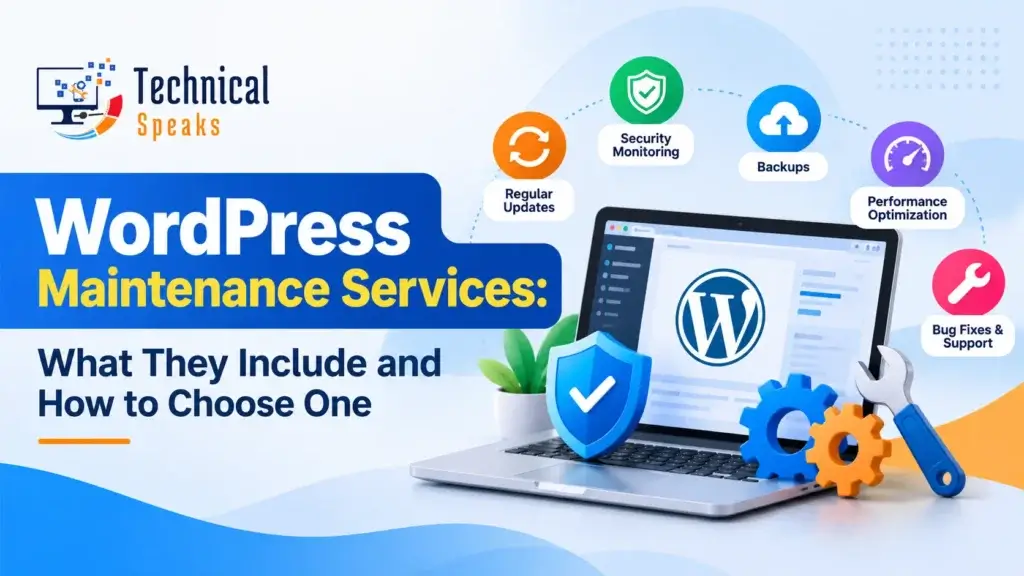
WordPress maintenance services keep your site updated, backed up, secure, fast and online, so you don’t have to check on it every week yourself. A good plan covers core, theme and plugin updates, off-site backups, security scans, uptime monitoring, speed checks and support when something breaks.
This guide explains what’s usually included and what isn’t, when it makes sense to do it yourself, and how to pick a provider you can trust.
Why WordPress sites need regular maintenance
WordPress itself is solid, but most sites run a theme and a dozen or more plugins from different developers. Each one gets updates, and each one can break, conflict or become a security risk if it’s ignored.
Without regular care, sites tend to run into the same problems:
- Outdated plugins that attackers can exploit
- Updates that break the layout or a form, and nobody notices for weeks
- Slower loading as images, plugins and database clutter pile up
- Old PHP versions that stop getting security fixes
- Broken links and 404 errors after content changes
- Downtime that only gets noticed when a customer complains
Hacked spam content can also lead to Google warnings or a manual action, and a slow, broken site loses visitors and leads. See our guide to Google penalties in SEO for how that works.
What do WordPress maintenance services include?
Packages vary, but a solid plan usually covers these nine areas.
1. Security monitoring and malware scanning
- Regular scans for malware and known vulnerabilities
- Firewall setup and login protection (limited attempts, 2FA)
- Malware removal if something gets through. Check whether cleanup is included or billed separately.
2. Core, theme and plugin updates
- Updates applied regularly, not “when someone remembers”
- Testing after updates to check the site still works
- Removal of unused or abandoned plugins
- PHP version checks and upgrades
3. Off-site backups
- Automatic backups of files and the database, daily for active sites
- Copies stored away from your server (cloud storage)
- Several restore points kept for a set period
- Test restores, so you know the backups actually work
4. Speed and performance
- Caching, image compression and database cleanup
- Monitoring Core Web Vitals (LCP, INP, CLS)
- Spotting slow plugins and heavy scripts
For the detail, see our guide on how to speed up WordPress.
5. Uptime monitoring
- Checks every few minutes, with alerts by email, SMS or Slack
- Fast response when the site goes down
- Monthly uptime reports
6. Broken link and 404 checks
- Regular scans for broken internal and external links
- Proper 301 redirects in WordPress for moved or deleted pages
7. Reports
- A monthly summary of updates, backups, security scans, uptime and speed
- Optional SEO and analytics notes from Google Search Console and GA4
8. Staging
- A copy of your site where big updates are tested before they go live
9. Support
- A set number of hours or tasks per month for small fixes
- Clear response times for urgent problems
What’s usually not included
This is where most misunderstandings happen. Unless the plan says so, maintenance usually doesn’t cover:
- New features, pages or plugins
- Design changes or a redesign
- Writing or uploading content
- Full SEO campaigns
- Major development work or custom coding
- Hosting fees, premium plugin licenses or domain renewals
Ask for the exclusions in writing before you sign up.
DIY vs. hiring a maintenance service
| Doing it yourself | Hiring a service | |
|---|---|---|
| Cost | Your time plus tool costs | A monthly fee |
| Time | A few hours a month, more when something breaks | Very little |
| Skills needed | Comfortable with updates, backups and troubleshooting | None |
| Risk | Higher if updates or backups get skipped | Lower, if the provider is reliable |
| Best for | Small blogs, technical owners, low-risk sites | Business sites, online stores, lead-gen sites |
If you want to handle it yourself, our WordPress security checklist includes a daily, weekly and monthly schedule you can follow.
Typical maintenance plan tiers
Pricing varies a lot by provider, country and site size, so compare what’s included, not just the monthly price.
| Tier | Usually includes | Good for |
|---|---|---|
| Basic | Updates, weekly or daily backups, security scans, uptime monitoring | Small brochure sites and blogs |
| Business | Everything in Basic, plus daily off-site backups, speed optimization, staging, monthly reports, some support time | Service businesses and lead-gen sites |
| Ecommerce / Premium | Everything in Business, plus more frequent backups, checkout testing, priority support, malware cleanup, more support hours | WooCommerce stores, membership and high-traffic sites |
Maintenance for WooCommerce stores
Online stores need extra care, because a broken checkout means lost sales right away:
- Test the cart, checkout and payment flow after every update.
- Update payment gateway plugins promptly.
- Back up more often, since orders change the database all day.
- Never cache cart, checkout or account pages.
- Watch stock, shipping and tax plugins for conflicts.
How to choose a WordPress maintenance provider
Questions to ask:
- How often are updates applied, and do you test the site afterward?
- Where are backups stored, how long are they kept, and do you test restores?
- Is malware cleanup included if my site gets hacked?
- Do you use a staging site for big updates?
- What are your response times for urgent and normal issues?
- How many support hours or tasks are included each month?
- What’s in the monthly report? Can I see a sample?
- What’s not included, and how are extra tasks billed?
- Who has access to my site, and how are logins kept secure?
- If I leave, do I keep my backups and access?
Red flags:
- No off-site backups, or backups only on the same server
- “Unlimited everything” for a very low price
- No written response times or service agreement
- Updates applied blindly with no testing
- Vague reports, or no reports at all
- They want to keep admin access but won’t explain their security
FAQ
What do WordPress maintenance services include?
Typically core, theme and plugin updates, off-site backups, security scans, uptime monitoring, speed checks, broken link fixes, monthly reports and a set amount of support.
Can I maintain my WordPress site myself?
Yes, if you have the time and are comfortable with updates, backups and fixing problems. Many business owners outsource it so they can focus on running the business.
How often should WordPress maintenance be done?
Security scans and backups daily for active sites, updates at least weekly, and a deeper check of speed, users and plugins every month.
Is malware removal included in maintenance plans?
Sometimes. Some plans include cleanup and others charge separately, so ask before you sign up.
Do I still need maintenance if my host offers backups and security?
Often yes. Hosts usually protect the server, while maintenance covers your site: updates, testing, plugin issues, speed and support. Check what your host covers so you don’t pay twice.
How much do WordPress maintenance services cost?
It depends on the provider, your site’s size and what’s included. Compare plans by features, response times and exclusions rather than price alone.
Final thoughts
WordPress maintenance services aren’t about one big fix. They’re about steady, regular care: updates, backups, security, speed and someone keeping an eye on things. Whether you do it yourself or hire a provider, make sure updates are tested, backups are stored off-site and restorable, and you know exactly what’s included.
Building a new site? Start with a fast, lightweight theme (see our list of free WordPress themes for beginners), and if you’re running campaigns, learn how to create a landing page that converts.
Want your WordPress site looked after properly? Get in touch with our team today.
Saurabh K. has been working in SEO and digital marketing for 10+ years, helping businesses grow their search traffic.